
How Post Jobs on LinkedIn: how post jobs on linkedin for hiring remote talent

Posting a job on LinkedIn seems simple enough on the surface: head to the "Jobs" tab, click "Post a Job", fill out the form, and decide whether to pay or go free. But to truly master it—to attract the right remote talent from the very beginning—you need a solid game plan.
Laying the Groundwork for LinkedIn Hiring Success
Before you even dream of writing a job description, let's talk about your LinkedIn Company Page. For a remote-first company, this page is your office. It's often the very first handshake a potential candidate has with your brand.
Think about it: a neglected page with a blurry logo and posts from two years ago sends a clear message. It screams disorganization, which is a massive red flag for top-tier remote professionals who live and breathe clear communication and a sharp digital presence.
A well-tended Company Page is a powerful recruiting magnet. It’s your space to tell a compelling story about your mission, your culture, and, most importantly, your commitment to remote work. This is how you give that "office tour" when there's no physical office to show. A key part of your strategy is also learning how to actively boost your reach on LinkedIn, which will get your job posts in front of more of the right people.
Choosing Your Job Posting Method
With your Company Page looking sharp, you next need to decide how you're going to announce the opening. There’s no single right answer here. The best path depends entirely on your budget, how quickly you need to hire, and the specific role you’re trying to fill.
You’ve got three main options on the table:
- A Standard Job Post: This is the go-to for most. You create a dedicated listing through the "Jobs" section, perfect for individual hires. It gives you space for detailed descriptions, lets you tag key skills, and even add screening questions.
- LinkedIn Recruiter: This is the premium, subscription-based powerhouse. It's built for companies with high-volume or ongoing hiring needs, offering advanced candidate search filters, direct outreach tools, and some serious applicant management features.
- A Company Page Update: This one is simple and free. You just share a post about the opening on your company’s feed. While it doesn't have the formal application tools of a proper job post, it's a great way to tap into your existing followers and get people sharing.
This flowchart can help you visualize which path makes the most sense for your situation.
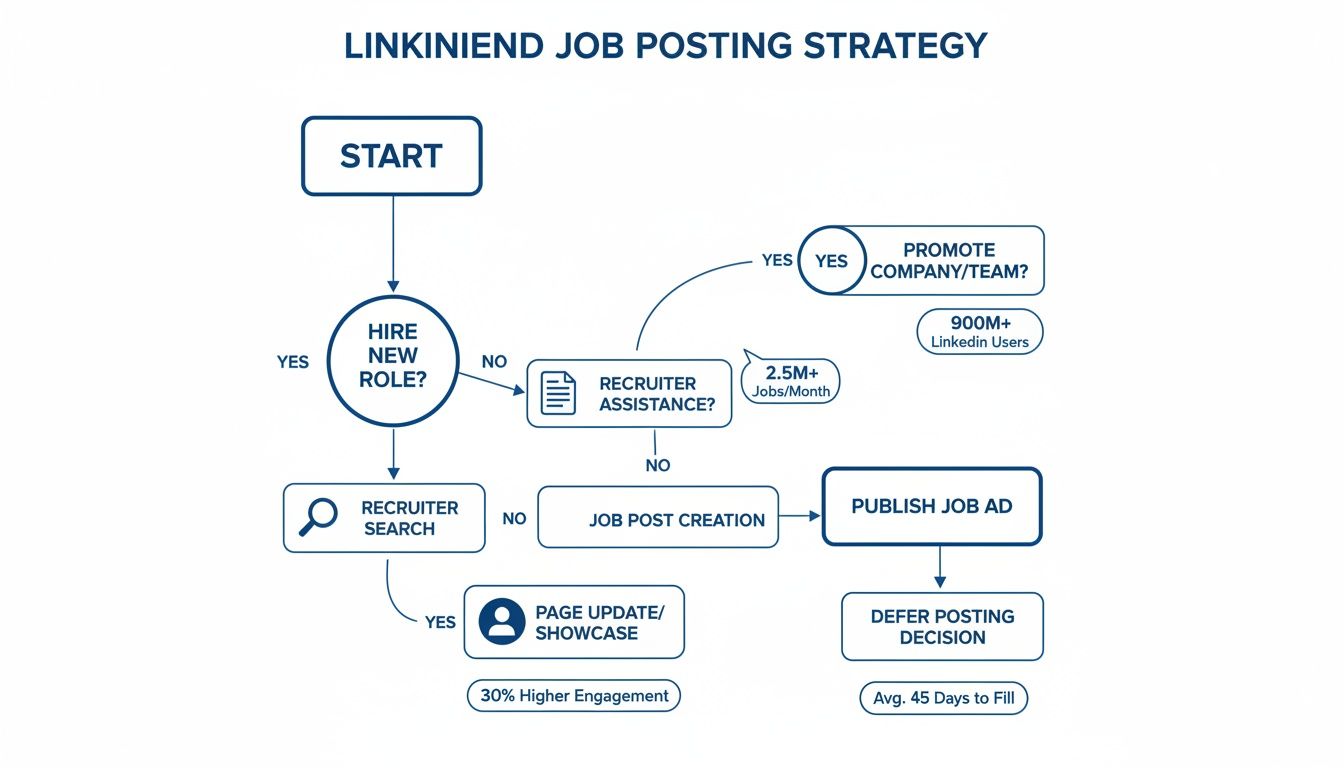
As you can see, a standard Job Post is a flexible starting point. Recruiter is for when you need to be proactive and hunt for talent, and a simple Page Update is your best bet for leveraging the network you already have.
To help you weigh the pros and cons at a glance, here’s a quick breakdown of these methods.
Choosing Your LinkedIn Job Posting Method
A quick comparison of the three primary ways to advertise a job on LinkedIn, helping you select the best option for your hiring needs.
| Method | Best For | Key Feature | Cost |
|---|---|---|---|
| Standard Job Post | Individual roles, structured hiring processes, reaching active job seekers. | Formal application tracking, skill matching, and screening questions. | Free or Pay-Per-Click |
| LinkedIn Recruiter | High-volume hiring, specialized roles, proactive candidate sourcing. | Advanced search filters, InMail credits for direct outreach, project folders. | Subscription-based |
| Company Page Update | Leveraging existing followers, low-budget hiring, filling junior roles quickly. | Casual, shareable format that taps into your company's network. | Free |
Ultimately, the right choice will align with your company's immediate hiring goals and resources. For most, a Standard Job Post is the perfect place to start.
The Power of a Polished Presence
Never underestimate the power of a strong foundation. Posting jobs on LinkedIn is a huge deal—the platform is responsible for hiring 6 people every single minute, which adds up to over 3 million new hires a year. That’s a staggering number, and it's why so many companies are flocking to its massive talent pool.
With 77 job applications submitted every second, a polished and professional Company Page is what makes you stand out from the noise.
A candidate's journey doesn't start with your job post; it starts with your brand. Your LinkedIn Company Page is the first chapter of that story. Make sure it's one they want to keep reading.
In the end, both your personal and company profiles work together to fuel your hiring success. To really sharpen your personal brand for professional impact, take a look at our guide on https://www.remoteweek.io/blog/how-to-optimize-linkedin-profile. By building this strong foundation first, you ensure that when you finally post that job, you aren't just broadcasting an opening—you're inviting great candidates into a compelling and trustworthy remote workplace.
Crafting Job Posts That Attract Top Remote Talent
In the world of remote work, a generic job description is the fastest way to get your opening completely ignored. Let's be honest: top candidates aren't just looking for any remote job; they're looking for the right one. Your job post on LinkedIn is your first—and most critical—chance to prove you’re it.
This is about much more than just listing responsibilities. It’s about storytelling, being precise, and truly understanding what makes a remote professional tick. Let's break down how to create a LinkedIn job post that doesn't just list a role but actually sells an opportunity.
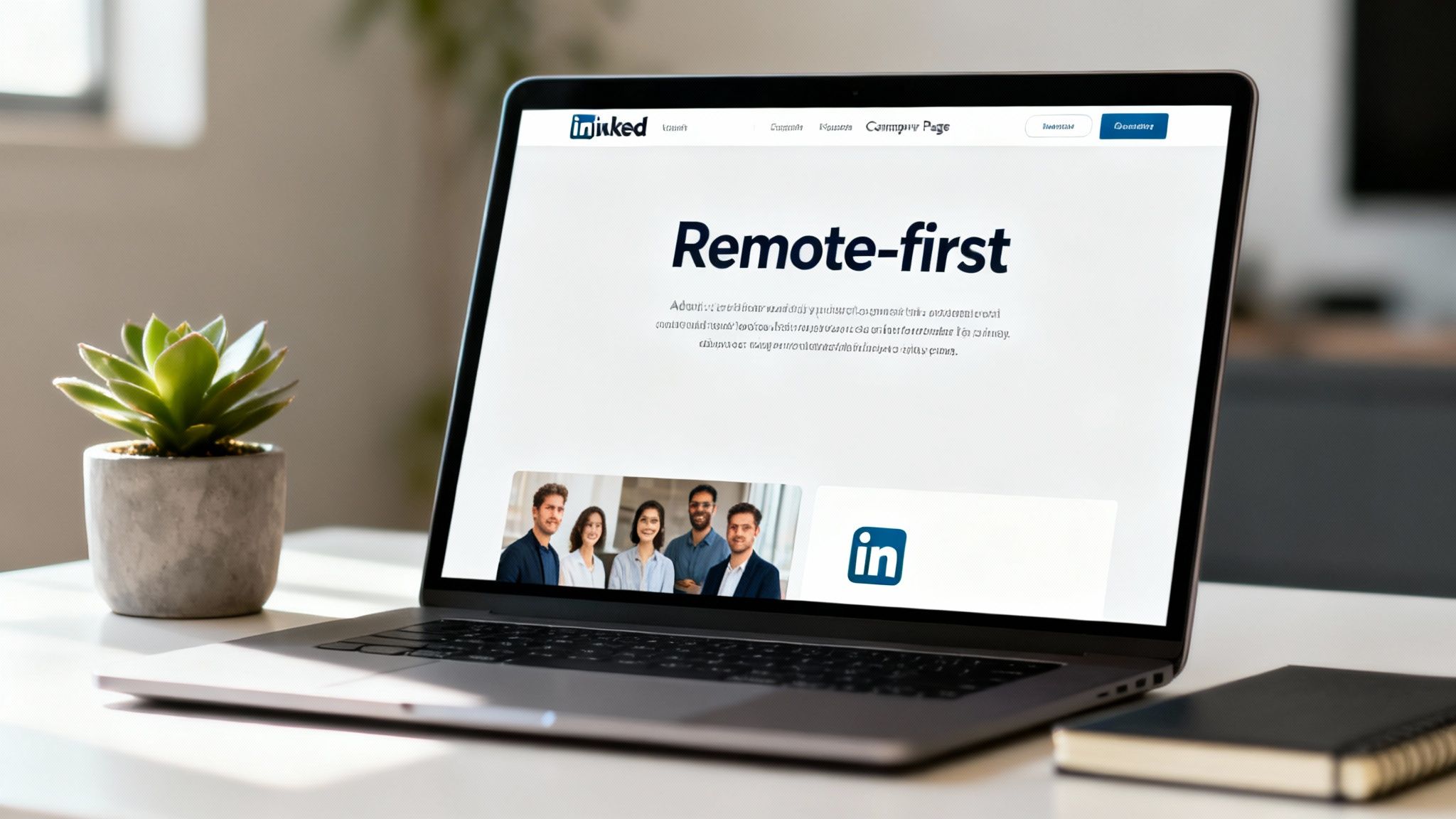
This image perfectly captures what you're selling: a professional, organized, and inviting remote work life. Your job post needs to echo that feeling, conveying a culture built on trust and clarity.
Start with a Magnetic Job Title
Your job title is your headline. It has one job: get the right person to click. While it’s tempting to get creative, clarity always wins on a platform like LinkedIn where keywords are king.
Instead of a vague "Software Engineer," get specific. Something like "Senior Backend Engineer (Python, Django) | 100% Remote" tells a candidate exactly what they need to know at a glance. It hits the right technical skills and, crucially, screams its remote-friendly nature from the rooftops.
Here’s how to nail the title:
- Specify Seniority: Use terms like "Lead," "Senior," or "Junior" to immediately filter for the right experience level.
- Name Key Tech: Mention one or two non-negotiable technologies (e.g., React, AWS, HubSpot) to attract people with the right stack.
- Shout "Remote": Always, always include "(Remote)," "(Fully Remote)," or "(Remote - US)" to show up in searches where candidates are filtering for these roles.
This small tweak alone can dramatically boost your post’s visibility to the people you actually want to hire.
Write a Description That Tells a Story
Okay, you got the click. Now, the job description has to deliver. This is your chance to move beyond a dry list of duties and paint a picture of what it’s really like to be on your team.
Kick things off with your company's mission. Why do you exist? What problem are you solving? High-performers want their work to matter, and leading with your purpose is an incredibly powerful hook.
Next, shift the focus to the role's impact. Don't just list what they'll do; explain what they will achieve.
The "Before": "Write and maintain code for our primary application."
The "After": "You will own the development of our new real-time analytics dashboard, a feature that will directly empower thousands of our customers to make smarter business decisions."
See the difference? You’ve just connected daily tasks to a larger, more inspiring outcome. The job becomes a mission. A great way to frame this is to think about what recruiters look for in resumes and then mirror those high-impact points in your description.
Showcase Your Remote-First Culture
For remote roles, culture isn't about the office ping-pong table. It's about how your team communicates, collaborates, and stays connected across different time zones. You need to be explicit about this.
Your job post should answer these make-or-break questions for any remote candidate:
- What are the time-zone expectations? Are you synchronous or asynchronous? Be crystal clear about any core working hours.
- What's your remote tech stack? Mention your core tools like Slack, Asana, Jira, or Notion. This proves you have an established infrastructure for remote work.
- How do you support your remote team? Talk about the good stuff—a home office stipend, a co-working space membership, or regular virtual team events.
Being transparent about these details builds immediate trust. It shows you've put real thought into creating a supportive remote environment. This commitment is a huge part of a compelling employee value proposition. For more inspiration, check out our deep dive on employee value proposition examples.
Put LinkedIn’s Built-In Tools to Work
LinkedIn gives you a whole suite of features designed to find the best matches. Don't be lazy and skip them—they really work.
Skills Tagging: LinkedIn lets you add up to 50 skills to your job post. My advice? Use every single one. The platform’s algorithm uses these tags to match your post with candidates who list those skills on their profiles. Think beyond just the obvious technical skills (e.g., "JavaScript"); add soft skills (like "Team Leadership") and tool-specific skills (like "Salesforce").
Screening Questions: This is your best defense against a tidal wave of unqualified applicants. You can add custom questions to confirm the absolute essentials right away.
Here are a few screening questions I find effective for remote roles:
- Are you legally authorized to work in [Country/Region]? (A simple, critical logistics check.)
- This role requires at least 3 years of experience with enterprise-level SaaS products. Do you meet this requirement? (A yes/no question to verify non-negotiable experience.)
- Describe your experience working in a fully remote, asynchronous team environment. (An open-ended question to get a feel for their communication style and remote work savvy.)
By thoughtfully crafting every piece of your job post, you stop just announcing an opening and start actively recruiting top-tier remote talent who are genuinely fired up about your company's mission.
Understanding LinkedIn Job Post Pricing and Promotion
So you've posted your job on LinkedIn. Great start, but that's just step one. Now, how do you make sure the right people actually see it? This is where a little strategic investment can make all the difference, connecting you with top-tier talent much faster than just hoping for the best.
Let's break down your options. When you post a job, you can let it run for free or put a budget behind it. Each approach has its place, and knowing when to use which is key.
Free vs. Sponsored Job Posts
A free job post is exactly what you’d expect. You can have one of these active at a time, and it’ll show up in search results for candidates who are actively looking. While this costs nothing, your post’s visibility is limited and tends to get buried pretty quickly as new, sponsored jobs push it down the feed.
A sponsored job post is essentially a paid ad for your open role. When you promote a post, you're buying it premium real estate—top placement in search results, a spot in the "Jobs You May Be Interested In" section, and even push notifications sent directly to qualified candidates' phones. This is how you shift from passively waiting to actively recruiting.
Think of it this way: a free post is a flyer on a busy community bulletin board. A sponsored post is a targeted digital ad campaign. Both might work, but only one gives you real control over who sees your message and how often.
Let’s say you’re hiring for a niche role like a "Senior Cloud Security Engineer (Remote)." A free post could easily get lost in the noise. But by sponsoring it, you can specifically target professionals who list "AWS Security" or "Azure Sentinel" as skills on their profile. That's a game-changer.
Setting Your Budget: The PPC Model
When you sponsor a job, you’re using LinkedIn's pay-per-click (PPC) advertising model. This is great because you only pay when someone is interested enough to actually click on your post. It’s a smart way to ensure your budget goes toward genuine engagement.
You have a couple of ways to control your spend:
- Daily Budget: You decide the maximum amount you're willing to spend each day. This is perfect for maintaining a steady stream of applicants over several weeks. A $25 daily budget, for instance, could work well for a marketing manager role you plan to keep open for a while.
- Total Budget: You set a single, fixed budget for the entire life of the post. LinkedIn then works to get you the best results within that amount. A $500 total budget might be the right call for an urgent hire where you need to attract a lot of candidates, fast.
LinkedIn will suggest a budget based on similar jobs in your area and industry, which is a decent starting point. My personal advice? Start with their recommendation, but keep a close eye on performance for the first 48-72 hours. If you aren't seeing the quality or volume of applicants you need, it's easy to tweak the budget up or down.
Getting the Most Out of Your Promotion
Just throwing money at a post isn't a real strategy. To get the best return, you have to be deliberate. The goal isn't just to get more applicants—it's to get more of the right applicants without burning through your budget.
Here are a few tips I've picked up over the years for optimizing your spend:
- Lean on Your Skills: Before you hit "promote," make sure you've used all 50 skill tags available in the job description. LinkedIn's algorithm relies heavily on these to find and target the right people.
- Set Up Screening Questions: Your promoted post will naturally reach a wider audience, including people who aren't a good fit. Strong screening questions act as a filter, saving you from wasting your ad spend on clicks from unqualified candidates.
- Watch Your Cost-Per-Click (CPC): Keep an eye on the analytics. If your CPC is sky-high, it might mean your job title is too generic or your targeting is off. For example, try changing a title from "Sales Representative" to "SaaS Account Executive" and see if that brings your CPC down to a more reasonable level.
By pairing a well-written job post with a smart promotion strategy, you turn your hiring efforts from a game of chance into a targeted, effective campaign.
So, your job post is live, the budget is locked in, and the applications are starting to trickle—or flood—in. This is where the real work starts. Getting a job posted on LinkedIn is just the first step; the magic really happens when you can efficiently manage the candidates and actually understand how your post is performing.
If you get this part wrong, you risk overwhelming your team and, worse, creating a terrible experience for applicants. That can do real damage to your employer brand down the road.
Let’s walk through how to navigate this crucial stage without getting lost in a sea of resumes.
Cutting Through the Noise: A System for Reviewing Applicants
LinkedIn actually gives you a surprisingly good set of tools to manage applicants, almost like a lightweight Applicant Tracking System (ATS) baked right in. It’s designed to help you organize, filter, and prioritize candidates without having to immediately export everything to another piece of software. The goal here is speed—moving from a giant list to a curated shortlist of top contenders as quickly as you can.
When you dive into your applicant pool, you’ll find a dashboard with some really useful filters. You can slice and dice your candidate list by:
- Skill Match: This is my first stop. It uses the skills you tagged in the job post to show who lines up best with your must-haves.
- Screening Question Answers: Instantly weed out anyone who doesn’t meet your non-negotiables. If they can’t legally work in the country or don’t have the required certification, you’ll know right away.
- Recent Applicants: I always like to keep an eye on the newest applicants. It helps keep the momentum going and shows candidates you're actively reviewing, which they definitely appreciate.
My go-to workflow is a simple three-bucket system. As I scan each profile, I quickly rate them: “Good fit,” “Maybe,” or “Not a fit.” This simple act of sorting brings immediate order to the chaos. It lets me focus my best energy on the most promising people first and then circle back to the "Maybe" pile if I need to.
Using Data to Sharpen Your Hiring Strategy
Beyond just managing people, LinkedIn provides some fantastic analytics that tell you how your job post is really doing. This data is your feedback loop, showing you what’s hitting the mark and what’s falling flat. Ignoring these numbers is like driving blind—you might get there eventually, but it won’t be pretty.
When you access your job post analytics, you’ll see a breakdown of key metrics. Here are the ones I always pay the closest attention to:
| Metric | What It Tells You | How to Use It |
|---|---|---|
| Job Views | How many eyeballs your post is getting. | Low views? Your job title probably isn't grabbing attention or your targeting is off. Try adding more specific keywords or tweaking your sponsored budget. |
| Applicants | The total number of people who actually applied. | A high view-to-applicant ratio is great—it means your description is compelling. A low one might mean your requirements are unclear or the salary isn't competitive. |
| Top Skills | The most common skills your applicants have. | If these skills don't match your needs, your post is attracting the wrong crowd. Go back and make your skill tags more precise. |
These insights are gold for making adjustments on the fly. For instance, if I see a ton of views but very few applicants for a remote role, I'll immediately go back and check the job description. Maybe our remote work policy isn't clear enough. Making small, data-informed tweaks can massively improve the quality of your applicant pool.
For a deeper dive into attracting the right kind of talent, our guide on how to hire remote employees has some great strategies you can use.
Your job post analytics aren't just vanity metrics; they're a direct reflection of your post's effectiveness. Use them to diagnose problems and make data-driven decisions, turning every post into a learning opportunity for the next hire.
When you combine a structured review process with a sharp eye on your performance data, hiring stops being a reactive chore and becomes a proactive strategy. You’ll not only find better candidates faster but also build a repeatable system that makes every future hire on LinkedIn that much easier.
Ready to Level Up Your LinkedIn Recruiting?
Once you've got the hang of the basics, it's time to get a real competitive edge. The old "post and pray" method just doesn't fly anymore, especially when you're after top-tier remote talent. The best recruiters I know think way beyond the job description—they turn their entire LinkedIn presence into a hiring powerhouse.
These strategies are all about shifting from a reactive to a proactive mindset. It's about building your employer brand, tapping into those hidden talent pools, and making your job openings impossible for the right people to ignore. This is how you stop just filling seats and start building a pipeline of incredible talent for the future.
Turn Your Team into a Recruiting Force
Let’s be honest: your current employees are your most powerful—and most underutilized—recruiting asset. A share from your company page is fine, but a genuine, personal post from a team member? That’s marketing gold. People trust other people way more than they trust brands.
Encourage your team to share job openings on their personal profiles, but with their own authentic spin. A simple post like, "I absolutely love working here, and our engineering team is hiring a new backend dev. Here's why I think it's such a great place..." is unbelievably effective.
This one move accomplishes so much at once:
- Massive Reach: It instantly pushes your job post into new, highly relevant networks. Think about it: a developer on your team is probably connected to dozens of other great developers.
- Instant Social Proof: A recommendation from a current employee is a powerful testimonial. It builds immediate trust and makes potential candidates feel more confident about applying.
- Better-Fitting Candidates: Referrals often bring in people who are a better cultural fit from day one, since they already have a connection to your team's vibe and work style.
The key is to make it easy for them. Send them a direct link to the job post and maybe a few key bullet points they can use for inspiration. Just make sure to emphasize that their personal touch is what truly makes it work.
Use Video to Show, Not Just Tell
A wall of text can only do so much. Video, on the other hand, brings your company culture to life in a way that words just can't match. A short, informal video embedded in your job post or shared on your company page can seriously boost engagement.
And no, you don't need a Hollywood production budget. A simple video shot on a smartphone can be incredibly powerful if it's authentic.
Pro Tip: Have the hiring manager record a quick, 60-second video. They can talk about the team's mission, the real impact the new hire will have, and what makes their team a great place to work. It’s personal, direct, and helps candidates actually picture themselves in the role.
This approach completely humanizes the hiring process. Candidates get to see the real people behind the brand, which makes your company feel more approachable and transparent—two things that remote professionals value highly.
Spotlight Priority Roles with the Featured Section
Right near the top of your LinkedIn Company Page, there's a "Featured" section. Most companies use this spot to pin a press release or a link to their homepage. That’s a huge missed opportunity.
Use this prime real estate to spotlight your most critical or hard-to-fill roles. When a candidate lands on your page, a featured job post is one of the very first things they'll see, giving it an extra layer of visibility and importance.
You can feature a direct link to the LinkedIn job post or even a regular feed post announcing the opening. This is especially smart for senior-level positions or roles that are crucial to your company's growth. It sends a clear signal: this isn't just another job opening—it's a top priority.
Avoid These Common Employer Brand Killers
Even the most brilliant strategies can be shot down by simple mistakes that tarnish your reputation. As you're posting jobs, be vigilant and steer clear of these common pitfalls that turn great candidates away.
- Vague Job Titles: I see it all the time—titles like "Ninja" or "Guru." They’re confusing, sound a bit dated, and perform terribly in search. Stick to clear, industry-standard titles that candidates are actually searching for.
- Slow Response Times: In a competitive market, top talent has options, and they don’t wait around. Acknowledge every application quickly, even with an automated message, and give people a rough timeline for the process. Leaving candidates in the dark is the fastest way to lose them to another offer.
- A Ghost Town Company Page: An inactive company page with no recent updates can look like a red flag. It might suggest a lack of engagement or, worse, instability. Post regular updates about your company, your team, and your culture to show that you're an active and thriving place to work.
Your Top Questions About Posting Jobs on LinkedIn, Answered
Even when you have a plan, getting into the nitty-gritty of posting jobs on LinkedIn can feel a bit like navigating a maze. I get asked about the specific costs, the different tools, and how to actually get the right people to apply all the time. Let's clear up some of the most common questions that come up.
So, How Much Does It Really Cost to Post a Job?
Yes, you can post one job at a time for free, but let's be honest—its visibility is incredibly limited. Free posts tend to sink without a trace pretty quickly. If you're serious about hiring, you'll need to sponsor your job post, which runs on a pay-per-click (PPC) model. The good news is you only pay when someone actually clicks on your ad.
You’re in the driver’s seat when it comes to cost. You can set a daily budget or a total budget for the entire time the ad is live. The price you pay for each click isn't fixed; it shifts based on a few key things:
- How competitive the job title is. A "Senior Software Engineer" will cost more per click than a more niche role.
- The location you're targeting. Targeting a major tech hub is more expensive than a smaller city.
- The market demand for the skills you need.
Realistically, a budget could be a few hundred dollars for a junior position or climb into the thousands for a C-suite or highly specialized engineering role. It all comes down to how competitive the market is and how fast you need to fill that seat.
Should I Be Using LinkedIn Jobs or LinkedIn Recruiter?
This is a big point of confusion, but the answer is actually pretty straightforward. It boils down to one thing: your hiring volume.
Use LinkedIn Jobs when you're hiring for a few specific roles. Think of it as the standard, à la carte option. You post a job, manage the applicants for that single opening, and can pay to promote it. It's the perfect tool for most small and medium-sized businesses that hire occasionally throughout the year.
Choose LinkedIn Recruiter when hiring is a constant, strategic part of your business. This is a powerful, subscription-based platform built for recruiters who are actively sourcing candidates, not just waiting for them to apply. It gives you advanced search filters, the ability to send InMail messages, and tools to build talent pipelines for future roles. It’s the professional-grade toolkit for dedicated HR teams.
In short: LinkedIn Jobs is for filling an empty chair. LinkedIn Recruiter is for building your entire team.
How Do I Make My Remote Job Post Actually Stand Out?
With everyone offering remote work these days, simply putting "remote" in the title isn't enough. You have to show you truly embrace it. To cut through the noise, get specific and be enthusiastic about your remote culture.
Start right in the job title. Something like "Senior Product Manager (100% Remote, US-Based)" is instantly clear and attractive. Then, in the job description, talk about how you work remotely.
Mention your communication stack (like Slack or Notion), detail any home office stipends, and highlight your philosophy on asynchronous work. Talking about flexibility and how you support a healthy work-life balance will do more to attract top remote talent than just about anything else.
How Long Should I Keep the Job Post Active?
A standard free job post on LinkedIn automatically expires after 30 days. You can, of course, close it sooner yourself. If you’re paying to sponsor the post, it will stay live as long as there’s money in your budget.
But here’s a piece of advice from experience: don’t just "set it and forget it." Check in on your post's performance after the first week. If you aren't getting the quality applicants you hoped for, it's a clear signal that you need to tweak the job title, description, or the skills you’ve tagged.
And please, once you’ve hired someone, close the post immediately. Leaving a filled role open is frustrating for job seekers and can slowly tarnish your employer brand. Respecting candidates' time is a small thing that makes a big difference.
At RemoteWeek, we believe finding the right remote talent shouldn't be a game of chance. Our platform is dedicated to connecting employee-focused companies with top-tier professionals seeking healthy, supportive remote workplaces. We cut through the noise by featuring only vetted companies with strong cultures, making your search for the perfect candidate more efficient and effective. Start hiring with confidence today.